Most Indian businesses outgrow their systems long before they realize it. The first sign is a spreadsheet with 47 columns. The second is a WhatsApp group where deals are tracked in voice notes. The third is a Zoho subscription that nobody uses because it does not match how the business actually works. By the time a founder asks about custom CRM development, they have already lost lakhs in missed follow-ups, duplicate data, and deals that fell through the cracks.
This guide covers everything you need to know about custom CRM development India in 2026 — the complete resource for businesses evaluating a CRM development company India — what it costs, what it includes, whether you actually need it, and how to build one that your sales team will use every single day.
Get a free CRM consultation — WhatsApp +91 7009340397
SECTION 1: WHAT IS CUSTOM CRM DEVELOPMENT INDIA?
A CRM (Customer Relationship Management) system is the software that manages every interaction between your business and your customers — leads, enquiries, follow-ups, deals, invoices, support tickets, and renewals.
Custom CRM development India means building a CRM system specifically designed for how your business operates — rather than adapting your business to fit a generic software product.
What a custom CRM is built on: A custom CRM is typically a web application built on a modern tech stack (React frontend + Node.js or Python backend + PostgreSQL or MySQL database). It runs in a browser, works on mobile, and connects to the other tools your business already uses.
What custom CRM development is not: It is not buying a Zoho or Salesforce subscription and asking someone to configure it. That is platform implementation, not CRM development. Custom development means writing code that creates a completely new application tailored to your specific processes.
The defining question: If you describe your sales process to a CRM company and they say "our software does not support that workflow," you need custom development.
SECTION 2: WHO NEEDS A CUSTOM CRM?
Any reputable CRM development company India will start the conversation by asking these qualifying questions — because custom CRM makes sense only for businesses that match one or more of these profiles:
Your process is genuinely unique — Real estate developers who track plots, units, phases, and booking stages. Healthcare businesses that track patients across multiple touchpoints and need clinical data privacy. Logistics companies where a "deal" involves route planning, driver assignment, and real-time tracking.
You have tried off-the-shelf and failed — Zoho was set up, used for 3 months, abandoned. Salesforce was too expensive and too complicated. HubSpot is marketing-focused and does not serve your B2B sales process. If two or more tools have been tried and rejected, custom is the right next step.
You need deep integrations — Your business depends on WhatsApp, Razorpay, an ERP, a property portal API, or a government database. Off-the-shelf CRMs have limited or expensive API access. Custom CRMs integrate natively with exactly what you need.
You have 10+ sales team members — Below 10 users, the overhead of managing a complex system may not justify custom development. Above 10, the productivity gains and data quality improvements from a purpose-built system pay back quickly.
You need compliance — Healthcare CRMs handling patient data must meet DPDP Act requirements. Education CRMs handling student records need specific privacy controls. Financial CRMs may need audit trails and encrypted fields. Generic CRMs rarely offer these as standard.
You want to own your data — Cloud CRM subscriptions mean your customer data lives on someone else's server, subject to their privacy policies, pricing changes, and service continuity. A custom-built CRM is yours entirely.
SECTION 3: CRM VS EXCEL VS ZOHO VS SALESFORCE
Custom CRM vs Zoho vs Salesforce — The Full Comparison
| Factor | Excel / Sheets | Zoho CRM | Salesforce | Custom CRM |
|---|---|---|---|---|
| Cost | Free | Rs. 800–Rs. 3,000/user/mo | Rs. 3,000–Rs. 12,000/user/mo | One-time build cost |
| Customization | Manual | Limited modules | Extensive (expensive) | 100% custom |
| Mobile App | Basic | Yes | Yes | Custom-built |
| WhatsApp Integration | None | Paid add-on | 3rd party | Native |
| API Connections | Manual | Standard connectors | Enterprise connectors | Anything |
| Automation | Manual | Rule-based | Advanced | Fully custom |
| AI Features | None | Basic (Zia) | Salesforce Einstein | Choose your AI stack |
| Data Ownership | Local | Zoho servers | Salesforce servers | Your server |
| User Training | Low | Medium | High | Your team-specific |
| Scaling Cost | High (manual) | Per-user pricing | Per-user pricing | None |
| Support | Self | Ticket system | Enterprise support | Direct team |
When Each Option Makes Sense
Excel / Google Sheets — Works for solo operators and micro-businesses with under 50 active leads. Breaks completely above that threshold. No automation, no reminders, no collaboration without version conflict.
Zoho CRM — In the custom CRM vs Zoho debate, Zoho wins on speed-to-start for small businesses that want standard sales pipeline features. Becomes expensive per-user at scale. Customization requires Zoho's proprietary platform knowledge (Zoho Creator). Automation is rule-based, not intelligent.
Salesforce — Industry-leading enterprise CRM. Expensive, complex, and requires a certified Salesforce administrator to operate effectively. Appropriate for companies with 100+ sales team members and dedicated IT resources. Most Indian SMBs are over-served by Salesforce.
Custom CRM — Correct when your process does not fit standard modules, when the 3-year cost of a subscription exceeds the build cost, when you need specific integrations, or when you need to own your data infrastructure.
SECTION 4: CRM FEATURES CHECKLIST
Every serious custom CRM build should include these foundational features:
Core Pipeline Features
- Lead capture from all sources (website form, WhatsApp, Instagram DMs, phone calls, email)
- Lead scoring and automatic qualification tagging
- Custom pipeline stages (named for your exact sales process)
- Drag-and-drop deal cards between stages
- Deal value tracking with weighted probability
- Lost deal analysis and reason tracking
Contact and Account Management
- Contact profile with complete interaction history
- Company/account hierarchy linking
- Duplicate detection and merge
- Custom fields (add any data field specific to your business)
- Tags and segments for bulk actions
- Document storage per contact (proposals, contracts, ID proofs)
Communication and Follow-up
- Activity timeline (calls, messages, meetings, tasks)
- Task assignment with due dates and reminders
- WhatsApp message log integration
- Email integration and tracking
- SMS reminder system
- Meeting scheduler with calendar sync
Reporting and Analytics
- Sales pipeline report (value at each stage)
- Conversion rate by stage, by salesperson, by source
- Revenue forecast (weighted by probability)
- Activity report (calls made, messages sent per rep)
- Lead source ROI analysis
- Custom dashboard per user role
Administrative Features
- Role-based access control (admin, manager, sales rep, read-only)
- Team performance leaderboard
- Audit log of all data changes
- Bulk import/export (CSV and API)
- Data backup and recovery
SECTION 5: AI FEATURES IN MODERN CRMs (2026)
AI is no longer an optional premium feature in CRM systems — it is becoming standard infrastructure. Indian businesses building custom CRMs in 2026 should consider these AI capabilities:
Lead Scoring AI — Machine learning models that analyze historical conversion data to score new leads by probability of closing. Instead of manual scoring rules, the system learns which lead characteristics correlate with conversion in your specific business. Implementation: OpenAI fine-tuned classifier or custom ML model trained on your CRM data.
Conversation Summarization — Automatically generates a summary of every WhatsApp conversation, email thread, or call transcript. Sales managers can review the last interaction with any lead in 10 seconds without reading the entire thread. Implementation: GPT-4 API with prompt engineering per message type.
Smart Follow-up Suggestions — AI analyzes the last interaction and the lead's stage to suggest the optimal follow-up action: "Send a proposal," "Schedule a demo," or "Mark as cold and reduce follow-up frequency." Implementation: Contextual AI agent with access to contact history.
Churn Prediction — For SaaS or subscription businesses, AI identifies customers showing disengagement signals (lower login frequency, fewer feature uses, support ticket spikes) before they cancel. Implementation: Classification model with behavioral data inputs.
Email and Message Drafting — AI drafts the first version of follow-up emails or WhatsApp messages based on the lead context and previous conversation. The sales rep edits and sends. Reduces writing time by 70%. Implementation: GPT-4 with company-specific prompt templates.
Voice Call Transcription and Analysis — Records and transcribes sales calls, extracts commitments made, and creates follow-up tasks automatically. Implementation: Whisper API transcription + GPT-4 extraction.
Natural Language Reporting — Ask the CRM "What are my top 5 deals at risk this week?" in plain text and receive an instant answer. No report configuration required. Implementation: GPT-4 with database query generation (text-to-SQL).
SECTION 6: WHATSAPP CRM INTEGRATION
WhatsApp is India's primary business communication channel. 73% of Indian business owners use WhatsApp as their primary lead communication tool — making WhatsApp CRM integration not a feature but a necessity.
What WhatsApp CRM Integration Enables:
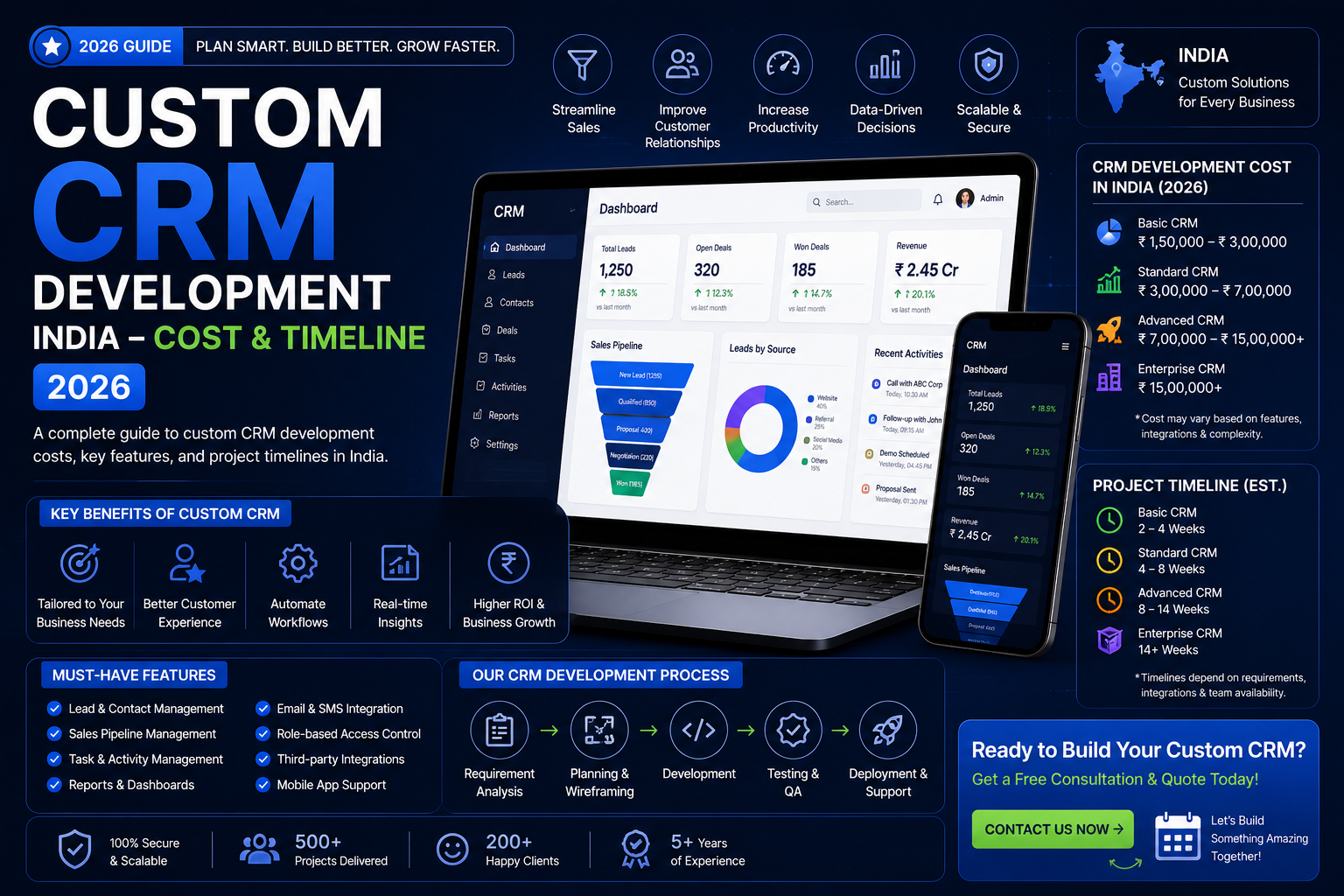
Centralized inbox — All WhatsApp conversations with leads flow into the CRM. Sales reps respond from the CRM interface without switching apps. Each message is automatically logged against the correct contact record.
Automated lead capture — When a new lead messages on WhatsApp, the CRM automatically creates a contact record, assigns it to the correct sales rep based on routing rules (geography, product line, availability), and sends an instant acknowledgement message.
Broadcast campaigns — Send WhatsApp messages to segmented contact lists (leads in "Proposal Sent" stage who have not responded in 7 days, for example). All responses flow back into the CRM.
Template message sequences — Pre-approved WhatsApp Business API templates sent at defined intervals: Day 1 enquiry acknowledgement, Day 3 product details, Day 7 follow-up, Day 14 final follow-up. All automated, all logged.
Click-to-chat lead source tracking — Every WhatsApp conversation is tagged with its lead source (website button, Instagram ad, Google Ads, referral) for ROI attribution.
WhatsApp CRM Technical Requirements
To build a compliant WhatsApp CRM integration, the Meta WhatsApp Business API is required (not WhatsApp Web). This requires:
- A WhatsApp Business Account (WABA) with Meta Business Verification
- Approved message templates for outbound communication
- A cloud hosting server (not shared hosting)
- Webhook-based real-time message delivery
Pixocraft Web builds complete WhatsApp CRM integrations as part of custom CRM development. View our WhatsApp chatbot development guide or see our automation services.
SECTION 7: CRM AUTOMATION WORKFLOWS
The difference between a CRM that gets used and one that gets abandoned is automation. Automation eliminates the repetitive manual tasks that make sales reps stop using the system.
The 8 Automations That Deliver Immediate ROI
1. New Lead Auto-Assignment Trigger: Lead form submitted on website or WhatsApp message received Action: Lead assigned to available sales rep based on round-robin or territory rules. Rep notified via WhatsApp within 60 seconds. Lead record created with source, timestamp, and initial data.
2. Stage-Change Follow-up Sequences Trigger: Deal moved to "Proposal Sent" stage Action: Automated WhatsApp message sent on Day 2 and Day 5 if no response. Tasks created for sales rep on Day 7. Manager notified if no activity by Day 10.
3. Stale Lead Reactivation Trigger: No activity on a lead for X days Action: Automated re-engagement message sent. If no response in 3 days, lead downgraded to "Cold" and added to a monthly nurture sequence.
4. Contract / Document Triggers Trigger: Contract sent for signature Action: Reminder to client on Day 3. Escalation to manager on Day 7 if unsigned. Celebration notification to team on signing.
5. Payment Reminders Trigger: Invoice created with due date Action: WhatsApp payment reminder 3 days before due. Second reminder on due date. Escalation task for finance team 2 days after overdue.
6. Birthday and Renewal Reminders Trigger: Stored date fields (client birthday, contract renewal date, product warranty expiry) Action: Automated message sent on or before the date. Task created for relationship manager.
7. Lead Source ROI Reports Trigger: Weekly or monthly schedule Action: Automated report generated and sent to marketing manager showing leads, deals closed, and revenue by source.
8. Onboarding Sequences for New Clients Trigger: Deal moved to "Closed Won" Action: Welcome message sent, onboarding checklist created, account manager assigned, first check-in call scheduled.
SECTION 8: INDUSTRY-SPECIFIC CRM EXAMPLES
Real Estate CRM
A real estate CRM must track assets (properties, units, plots) and relationships (buyers, brokers, investors) simultaneously — something generic CRMs cannot do.
Key modules:
- Property inventory — Projects, towers, floors, unit numbers, sizes, prices, availability status, RERA details
- Broker management — Broker profiles, commission structures, deal history, active leads
- Buyer pipeline — Lead source, budget, preferred configuration, visit history, offers made
- Booking management — Token amount, payment schedule, allotment letter, registration tracking
- Post-sales tracking — Construction updates, possession timeline, handover checklist
Integration needs: PropTiger / 99acres / MagicBricks API (lead capture), Razorpay (booking amount), WhatsApp Business API (buyer communication), Google Maps (property location display).
Cost: Rs. 1,50,000 – Rs. 4,00,000 depending on inventory size and module depth.
Healthcare CRM
A healthcare CRM must manage patient relationships with clinical context while maintaining DPDP Act compliance for health data.
Key modules:
- Patient profile — Demographic data, medical history summary, insurance information, consent forms
- Appointment management — Scheduling, reminders, cancellations, no-show tracking
- Referral network — Referring doctors, follow-up reports, co-management tracking
- Treatment pipeline — Diagnosis stage, treatment plan, follow-up schedule, outcome tracking
- Billing integration — Invoice generation, insurance claim tracking, payment follow-up
Integration needs: WhatsApp (appointment reminders), payment gateway, insurance claim portal, lab report systems.
Cost: Rs. 1,20,000 – Rs. 3,00,000 depending on clinic size and compliance requirements.
Education and EdTech CRM
Education CRMs manage the journey from inquiry to enrollment to completion — with different stakeholders (students, parents, counsellors, faculty) at each stage.
Key modules:
- Inquiry management — Course interest, preferred batch, communication history
- Counsellor pipeline — Assigned counsellor, counselling sessions, follow-ups
- Admission tracking — Application status, document verification, offer letter, fee payment
- Student portal — Course access, attendance, assignment submissions, progress reports
- Parent communication — Automated progress updates, fee reminders, event notifications
Integration needs: Razorpay (fee payment), Zoom/Google Meet (counselling sessions), WhatsApp (parent updates), LMS platform.
Cost: Rs. 1,00,000 – Rs. 2,50,000 for a coaching institute; Rs. 3,00,000+ for a full EdTech platform with LMS.
Logistics CRM
A logistics CRM tracks the commercial relationship between a logistics company and its corporate clients — separate from the operational fleet management system.
Key modules:
- Client management — Corporate accounts, contract terms, SLA parameters, key contacts
- Shipment pipeline — Quote, booking, in-transit, delivered, POD received stages
- Rate management — Client-specific rates, route pricing, fuel surcharge calculations
- Performance dashboard — On-time delivery percentage, damage rate, claim status per client
- Billing management — Invoice generation per trip or per period, credit terms, payment tracking
Integration needs: GPS tracking API (for live shipment status), e-way bill portal, Razorpay, WhatsApp (delivery notifications to clients).
Cost: Rs. 1,50,000 – Rs. 5,00,000 depending on integration complexity and number of operational modules.
SECTION 9: CRM DEVELOPMENT COST IN INDIA — 2026
Looking for a custom CRM development India quote? Skip to the package table below or WhatsApp +91 7009340397 for an instant estimate.
Featured snippet answer: Custom CRM development in India costs Rs. 1,00,000 to Rs. 8,00,000 depending on the number of modules, integrations, user roles, and AI features. A basic CRM for a small business costs Rs. 1,00,000 to Rs. 1,50,000. A full-featured CRM with AI, WhatsApp integration, and industry-specific modules costs Rs. 3,00,000 to Rs. 8,00,000.
Cost Breakdown by Module
| Module | Development Cost |
|---|---|
| Contact & Company Management | Rs. 25,000 – Rs. 40,000 |
| Custom Sales Pipeline | Rs. 30,000 – Rs. 50,000 |
| Activity & Task Management | Rs. 20,000 – Rs. 35,000 |
| WhatsApp Business API Integration | Rs. 35,000 – Rs. 60,000 |
| Email Integration | Rs. 15,000 – Rs. 25,000 |
| Reporting & Analytics Dashboard | Rs. 30,000 – Rs. 50,000 |
| Role-based Access Control | Rs. 15,000 – Rs. 25,000 |
| Mobile-Responsive Web App | Rs. 20,000 – Rs. 40,000 |
| AI Lead Scoring | Rs. 40,000 – Rs. 80,000 |
| AI Conversation Summary | Rs. 30,000 – Rs. 60,000 |
| Razorpay / Payment Integration | Rs. 15,000 – Rs. 25,000 |
| Third-Party API Integration (per API) | Rs. 10,000 – Rs. 25,000 |
| Custom Industry Module | Rs. 40,000 – Rs. 1,00,000 |
Full CRM Package Pricing
| Package | Modules Included | Users | Cost | Timeline |
|---|---|---|---|---|
| Starter CRM | Pipeline + Contacts + Tasks + Reports | Up to 10 | Rs. 80,000 – Rs. 1,20,000 | 5–7 weeks |
| Business CRM | Starter + WhatsApp + Email + Mobile | Up to 25 | Rs. 1,50,000 – Rs. 2,50,000 | 8–12 weeks |
| Professional CRM | Business + AI features + Automations | Up to 50 | Rs. 2,50,000 – Rs. 4,00,000 | 12–18 weeks |
| Enterprise CRM | Professional + Custom industry modules | Unlimited | Rs. 4,00,000 – Rs. 8,00,000 | 16–24 weeks |
Ongoing Cost After Launch
| Cost Component | Annual Range |
|---|---|
| Cloud hosting (AWS / Azure / Hetzner) | Rs. 12,000 – Rs. 60,000 |
| WhatsApp Business API (Meta) | Rs. 0.30–Rs. 0.80 per conversation |
| AI API costs (OpenAI / Anthropic) | Rs. 5,000 – Rs. 30,000 |
| Maintenance & updates | Rs. 12,000 – Rs. 40,000 |
| Total annual operating cost | Rs. 30,000 – Rs. 1,30,000 |
Compare this to Salesforce Professional for 10 users: Rs. 36,000/user/year = Rs. 3,60,000/year — and growing with every new user added.
View Pixocraft Web's full pricing
SECTION 10: CRM DEVELOPMENT TIMELINE
Featured snippet answer: A custom CRM takes 5 to 24 weeks to build depending on scope. A basic CRM (pipeline + contacts + tasks) takes 5 to 7 weeks. A full-featured CRM with AI, WhatsApp, and custom industry modules takes 16 to 24 weeks.
Phase-by-Phase Timeline
| Phase | Activities | Duration |
|---|---|---|
| Discovery & Architecture | Requirements, user stories, database schema, tech stack decision | 1–2 weeks |
| UI/UX Design | Wireframes, component library, user flow diagrams, design review | 1–2 weeks |
| Core Development | Database, authentication, contacts, pipeline, activities | 3–5 weeks |
| Integrations | WhatsApp API, email, payment, third-party APIs | 2–4 weeks |
| AI Features | Lead scoring, automation, conversation AI | 2–4 weeks |
| Testing & QA | Unit testing, UAT, performance testing, security audit | 1–2 weeks |
| Deployment | Cloud setup, domain, SSL, monitoring, data migration | 1 week |
| Training & Handover | Team training, documentation, support period | 1 week |
| Total | 12–21 weeks (average) |
SECTION 11: BUILD VS BUY ANALYSIS
3-Year Total Cost Comparison (10 Users)
| Platform | Year 1 | Year 2 | Year 3 | 3-Year Total |
|---|---|---|---|---|
| Excel / Google Sheets | Rs. 0 | Rs. 0 | Rs. 0 | Rs. 0 (but high hidden cost) |
| Zoho CRM (10 users) | Rs. 96,000 | Rs. 1,08,000 | Rs. 1,20,000 | Rs. 3,24,000 |
| Salesforce Professional | Rs. 3,60,000 | Rs. 3,96,000 | Rs. 4,32,000 | Rs. 11,88,000 |
| Custom CRM (Pixocraft) | Rs. 2,00,000 (build) | Rs. 50,000 (ops) | Rs. 50,000 (ops) | Rs. 3,00,000 |
The crossover point: A custom CRM built for Rs. 2,00,000 breaks even against Zoho at Rs. 8,000/month in 25 months. After 25 months, every rupee spent on Zoho is Rs. 8,000/month wasted.
The hidden cost of spreadsheets: Estimate 30 minutes per salesperson per day on manual data entry, follow-up tracking, and report preparation. For a 10-person sales team: 5 hours/day × Rs. 200/hour effective cost × 250 working days = Rs. 2,50,000 per year in productivity loss.
Decision Framework
Use this framework to decide:
| If you answer YES to this... | Then... |
|---|---|
| Off-the-shelf CRM was tried and abandoned | Build custom |
| Your sales process has 3+ unique stages | Build custom |
| You need WhatsApp natively in the CRM | Build or use our chatbot + CRM integration |
| You have 10+ users and plan to grow | Build custom (better 3-year economics) |
| Budget is under Rs. 80,000 total | Start with Zoho, build later |
| You need deep industry-specific features | Build custom |
| You are a solo founder pre-product-market-fit | Use free tier of HubSpot or Zoho |
SECTION 12: COMMON CRM MISTAKES INDIAN BUSINESSES MAKE
1. Building too many features upfront — The most expensive CRM mistake is trying to build everything at once. Start with the core pipeline, contacts, and tasks. Add AI and advanced automations in Phase 2 after the team is trained and adoption is confirmed.
2. Not involving sales team in the design — CRMs fail when designed by managers and executives without input from the sales reps who use it daily. A feature that seems important in a boardroom is often ignored in the field. Map real user workflows before writing a single line of code.
3. Skipping data migration planning — Old data (Excel sheets, previous CRM exports, Google Contacts) must be cleaned and structured before import. A CRM launched with dirty data creates confusion from day one. Plan 1–2 weeks for data preparation.
4. Choosing the wrong tech stack for scale — A CRM built on shared hosting or without a proper database indexing strategy will slow significantly at 10,000+ contacts. Architecture decisions at the start determine performance at scale.
5. No adoption training — Software does not sell itself internally. Every CRM launch requires hands-on training sessions, documentation, and a 2-week supervised adoption period where managers enforce usage.
6. No mobile access — 60% of sales interactions in India happen on mobile. A CRM without mobile-responsive design or a progressive web app will be abandoned by field sales teams.
7. Building in isolation from marketing — A CRM that does not share data with your WhatsApp campaigns, Google Ads, and email system creates data silos. Plan your integration architecture before development starts.
SECTION 13: CRM ROI EXAMPLES
Real Estate Developer — Pune
Before custom CRM: 3 salespeople tracking 200+ active leads in a shared Google Sheet. Average follow-up time: 3 days. Estimated 30% of leads never received a second contact.
After custom CRM: Automated lead assignment, WhatsApp follow-up at 4-hour intervals, daily pipeline report. Average follow-up time: 45 minutes. Lead conversion rate improved from 4% to 7%.
ROI calculation: 3% conversion improvement on 200 leads/month = 6 additional bookings. Average booking value: Rs. 80 lakh. Additional revenue: Rs. 4.8 crore/month from one CRM-attributed improvement.
Healthcare Clinic Chain — Delhi NCR
Before custom CRM: Appointment booking via phone only. No follow-up system for no-shows. No reactivation system for patients who had not visited in 6 months.
After custom CRM: WhatsApp appointment reminders cut no-show rate by 40%. Automated 6-month reactivation messages brought back 120 lapsed patients in month 1.
ROI calculation: 40% reduction in no-shows (15 recovered appointments/week × Rs. 800 avg consultation = Rs. 12,000/week). Lapsed patient reactivation: 120 patients × Rs. 800 = Rs. 96,000 in month 1 alone.
B2B Software Company — Bangalore
Before custom CRM: HubSpot used partially. Salespeople not logging activities. No visibility into pipeline health. Deals slipping between stages silently.
After custom CRM: Mandatory activity logging enforced by automation. Stage-stall alerts triggered after 7 days without movement. Manager review dashboard showing deals at risk.
ROI calculation: Pipeline visibility improvement identified Rs. 35 lakh in stalled deals in the first month. Recovery of 30% of those deals = Rs. 10.5 lakh in recovered revenue from historical pipeline leakage.
SECTION 14: FREQUENTLY ASKED QUESTIONS
What does CRM development cost India — and what affects the price? Custom CRM development in India costs Rs. 80,000 to Rs. 1,20,000 for a basic pipeline and contact management system, Rs. 1,50,000 to Rs. 2,50,000 for a mid-range system with WhatsApp integration and automation, and Rs. 3,00,000 to Rs. 8,00,000 for an enterprise system with AI features and custom industry modules.
Should I build a custom CRM or use Zoho? Use Zoho if your budget is under Rs. 80,000, your sales process fits standard pipeline stages, and you have fewer than 10 users. Build a custom CRM if you have tried Zoho and abandoned it, your process has unique stages or data fields, you need deep WhatsApp integration, or you have 15+ users where subscription costs exceed build costs within 2 years.
Is Zoho better than a custom CRM for Indian businesses? Zoho is faster to start and works well for businesses with standard sales processes. A custom CRM outperforms Zoho when your process is unique, when WhatsApp is your primary communication channel, when you need industry-specific modules, or when you have enough users that subscription costs exceed the custom build cost on a 3-year timeline.
How long does CRM development take in India? A basic custom CRM (pipeline, contacts, tasks, reports) takes 5 to 7 weeks. A full-featured CRM with WhatsApp integration, automation workflows, and AI features takes 12 to 18 weeks. An enterprise CRM with custom industry modules takes 16 to 24 weeks.
Can a custom CRM integrate with WhatsApp? Yes. Using the Meta WhatsApp Business API, a custom CRM can log all WhatsApp conversations against contact records, send automated message sequences, capture leads from WhatsApp directly into the pipeline, and provide a centralized inbox for your entire sales team. WhatsApp Business API requires Meta Business Verification and approved message templates.
Can a custom CRM have AI features? Yes. Modern custom CRMs built in India integrate AI through APIs (OpenAI, Anthropic, Google Gemini). Common AI features include lead scoring, conversation summarization, follow-up draft generation, churn prediction, and natural language reporting. AI features add Rs. 40,000 to Rs. 1,50,000 to the development cost depending on complexity.
What tech stack is used for CRM software development India? A typical modern CRM stack: React (frontend), Node.js or Python/Django (backend), PostgreSQL or MySQL (database), Redis (caching and session management), AWS or Hetzner (cloud hosting), WhatsApp Business API (messaging), and OpenAI API (AI features). Pixocraft Web builds all CRMs in this stack.
Can the CRM be accessed on mobile? Yes. Pixocraft Web builds all CRMs as responsive web applications that work on any mobile browser. For field sales teams requiring offline capability, a Progressive Web App (PWA) build is available.
How many users can a custom CRM support? A properly architected custom CRM can support unlimited users. Unlike Zoho or Salesforce, there is no per-user licensing fee. The system scales through cloud infrastructure, not software licensing.
What happens if I need new features after launch? Custom CRMs are modular. New features, modules, or integrations are added in subsequent development sprints. Pixocraft Web maintains all CRM projects we build and offers maintenance retainers for priority support and feature additions.
How secure is a custom CRM? A custom CRM built on modern security principles (JWT authentication, role-based access, encrypted database fields, HTTPS-only, regular security audits) is as secure as any commercial CRM. For healthcare and financial sector CRMs, we include DPDP Act-compliant data handling, field-level encryption for sensitive data, and audit trails.
Can I import data from my existing Zoho or Excel into the new CRM? Yes. Data migration is included in every CRM project. We import from CSV exports of Zoho, Salesforce, HubSpot, Freshsales, or Excel. Data cleaning and deduplication are handled during the migration phase.
Does Pixocraft Web offer a CRM trial or prototype? We provide a clickable prototype (Figma or interactive HTML) for design approval before development begins. This shows every screen and workflow before a single line of code is written.
Is CRM development appropriate for a startup? For pre-revenue startups, we recommend starting with HubSpot's free tier or Zoho's free plan. For startups post-funding (Seed and above) with an active sales team of 5+, a custom CRM is often justified — especially if the product itself involves unique data relationships that no off-the-shelf CRM handles.
How do I get started with custom CRM development? Start with a 30-minute discovery call where we map your current process, identify the right modules, and provide a fixed-price quote. WhatsApp +91 7009340397 or fill the form at web.pixocraft.in/contact.
SECTION 15: BUILD YOUR CUSTOM CRM WITH PIXOCRAFT WEB
Pixocraft Web builds custom CRM systems for Indian businesses in real estate, healthcare, education, logistics, B2B sales, and financial services. Every CRM we deliver is:
- React and Node.js-based — fast, modern, and maintainable
- WhatsApp Business API-integrated — native, not a bolted-on add-on
- AI-ready architecture — built so AI features can be added at any phase
- Mobile-responsive — full functionality on any device
- Fixed price and fixed timeline — no hourly billing surprises
- Yours to own — full source code and data ownership
Start Your CRM Project
Step 1 — WhatsApp us at +91 7009340397 with a brief description of your business and the problem you are solving.
Step 2 — Book a 30-minute free discovery call to map your process and identify the right modules.
Step 3 — Receive a fixed-price proposal within 48 hours.
Contacts:
- WhatsApp: +91 7009340397
- Project form: web.pixocraft.in/contact
- Pricing guide: web.pixocraft.in/packages
EXPLORE RELATED GUIDES
All Web Development and Automation Services Website Packages and Pricing Contact Our Team WhatsApp Chatbot Development India 2026 Web App Development Cost India 2026 Web App Development in India – Complete Guide 2026 Web Development Cost in India 2026 React Web Development Company India 2026 Best Web Development Company in Punjab 2026
This article is published by Pixocraft Web — a premium web development agency in India.